AI ADOPTION & AUTOMATION IN DYNAMICS
Your business rules.
Working on every order.
From approval to fulfilment, turn the decisions your team repeats into a connected Dynamics workflow. AI helps explain the exceptions. Your rules control what happens next.
Explore the workflow ↓SEE HOW THE WORK MOVES
Every decision.
A clear next action.
Follow one sample order through four connected screens. Try the controls to see how approval, delivery location and incoming stock change the outcome.
COMPANY-POLICY CHECKS
Release the right orders. Hold the exceptions.
Check manager approval and delivery dates against your predefined rules before an order moves to the warehouse.
- Confirm the required manager approval.
- Check that the requested delivery date meets your lead-time rule.
- Hold exceptions with a clear reason and next action.
Order release checks
Both required checks passed. The order can move to the next step.
No policy exception found. Release follows the configured checks.
WAREHOUSE SELECTION
Start with the delivery address. Find the closest warehouse.
Compare the delivery address with warehouse locations. Select the nearest eligible location, then check its stock before creating a pick.
- Calculate distance to each eligible warehouse.
- Apply your delivery-area and warehouse rules.
- Keep the reason for the selection visible to your team.
Delivery & warehouse
The closest eligible warehouse is selected. Stock availability is checked next.
Illustrative distances, not a live routing calculation.
STOCK PICKING & BACK ORDERS
Pick what is available. Keep the rest moving.
Allocate only stock that is available to pick. Split any shortage into a linked back order, so the original customer requirement stays in view.
- Create picks for available quantities only.
- Keep the unfilled quantity on a linked back order.
- Avoid waiting for a shortfall before releasing available items.
Stock allocation
| Item | Ordered | Available | Pick | Back order |
|---|---|---|---|---|
| Network cameraCAM-100 | 12 | 12 | 12 | — |
| Video recorderNVR-200 | 6 | 4 | 4 | 2 |
| Network switchNET-300 | 10 | 0 | — | 10 |
16 units ready to pick
Available stock only12 units awaiting stock
Linked to SO-1048Pick 12 cameras and 4 recorders now. Keep 2 recorders and 10 switches on the back order.
CROSS-COUNTRY REPLENISHMENT
Look beyond local stock. Close the back order.
When country stock is insufficient, check eligible stock in other countries. Replenish the receiving warehouse and resume fulfilment when the stock is received and available.
- Match the shortfall to an eligible replenishment source.
- Track the transfer against the outstanding order.
- Release the remaining pick after stock receipt and checks.
Replenishment workspace
Release the remaining 12 units only after the transfer is received and stock checks pass.
Demo only · No stock or order records are changed.
THE COMPLETE FLOW
Connected from start to finish.
We design the rules, integrations and AI assistance around your operation. These screens illustrate a tailored solution, rather than a standard Dynamics screen.
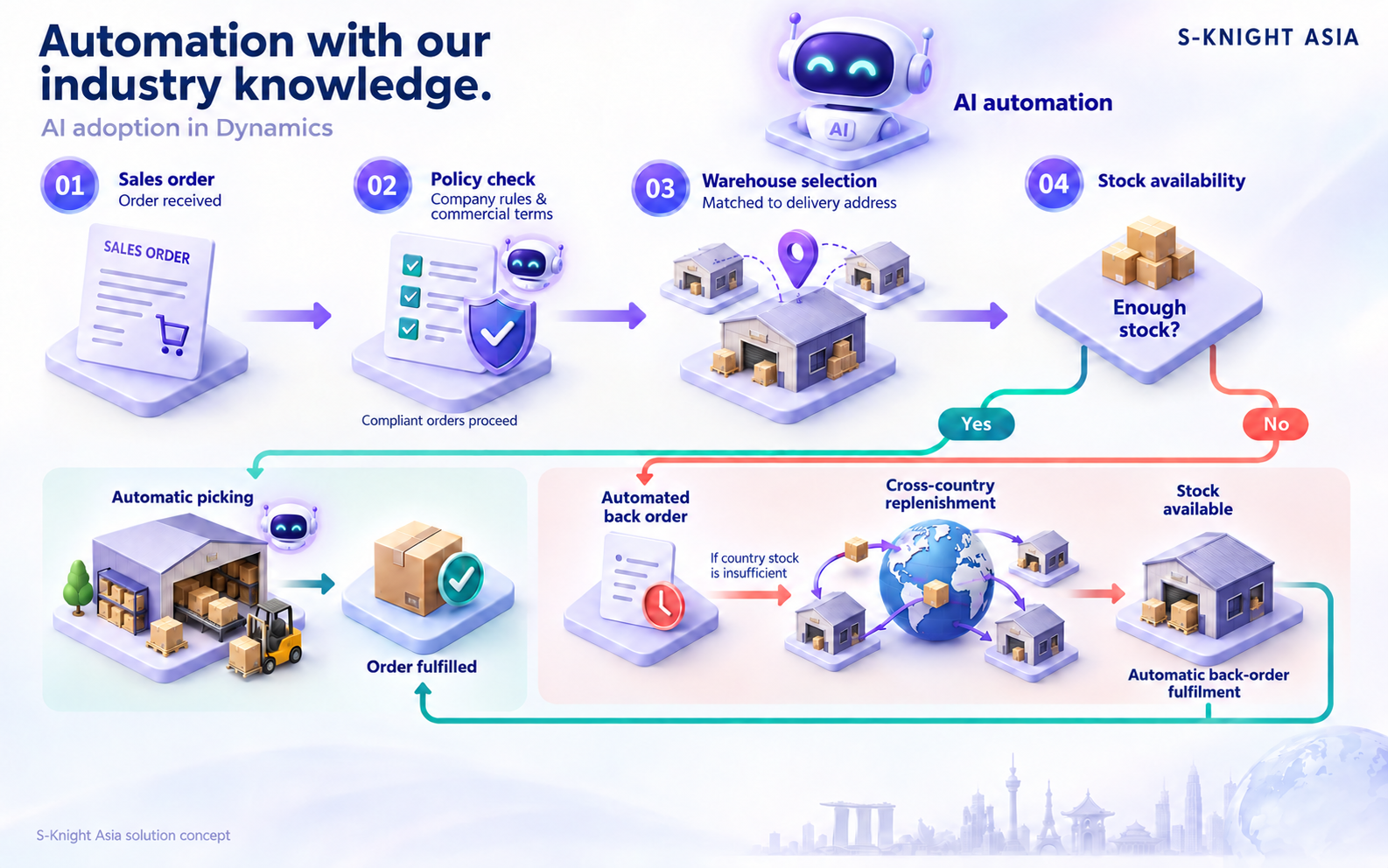
From company-policy checks to automatic fulfilment across countries.
INDUSTRY KNOWLEDGE, APPLIED
Built around security
technology distribution.
Explore the industry story behind policy checks, warehouse selection and stock fulfilment across countries.
BRING YOUR WORKFLOW
Which decisions could
your team stop repeating?
Start with your approval rules, delivery network and stock-handling process. We’ll shape a practical automation journey around them.